
Accounting Methodologies in TRES Finance
How does Tres Finance calculate cost basis?
Tres calculates the cost basis by using the following methodologies:
FIFO - First in, First out
WAC - Weighted Average Cost
LIFO - Last in, First out
Specific ID (Maximize Gains)
Specific ID (Maximize Losses)
First in, First Out (FIFO):
The First-In, First-Out (FIFO) method determines the cost of an asset transferred out of a wallet by using the cost of the earliest acquired asset in that specific stack.
Example:
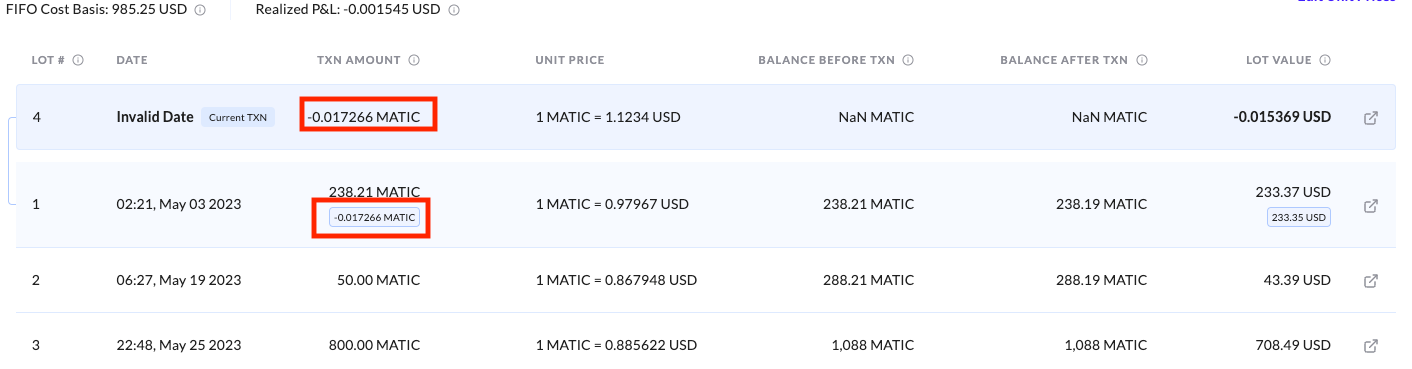
As shown in the example, the transferred amount of 0.017266 MATIC is deducted from the first "lot" in the stack. Consequently, the cost basis is calculated using the unit price of that initial lot: 0.97967.
Future MATIC transfers from this wallet will continue to draw from the first lot until its balance reaches zero. At that point, the system will automatically move to the next chronological lot in the stack to calculate the cost basis for subsequent transactions.
Weighted Average Cost (WAC):
The Weighted Average Cost (WAC) method determines the cost basis of an asset by averaging the purchase prices of all tokens currently held in a specific wallet. Unlike FIFO, which treats assets as individual "lots," WAC blends the cost of all inflows into a single, unified price per unit.
The cost basis is calculated by taking the total value of all tokens in the wallet and dividing it by the total number of tokens held.
Whenever a new inflow is received, the system automatically recalculates this average. It adds the cost of the new tokens to the total cost of the existing balance and then divides that sum by the updated total quantity of tokens. This ensures that every unit transferred out of the wallet carries the same "weighted" cost basis until the next deposit occurs.
Last in, First Out (LIFO)
The Last-In, First-Out (LIFO) method is the direct opposite of FIFO. It determines the cost basis of an asset transferred out of a wallet by using the cost of the most recent asset received in the stack.
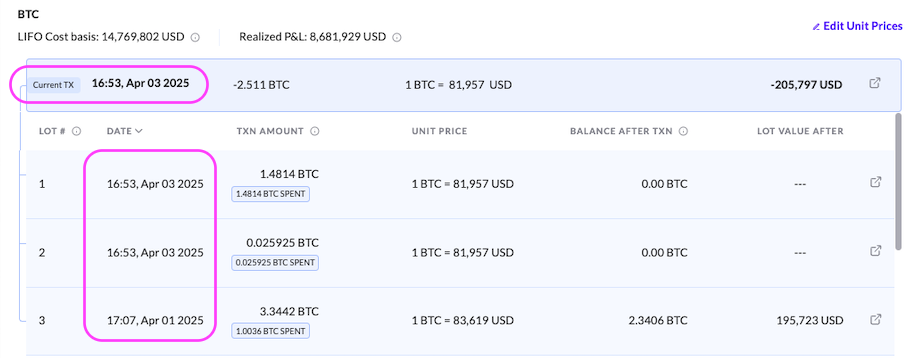
As shown in the example, when a transfer occurs, the system looks at the very last "lot" that entered the wallet. Based on this methodology, the cost basis is calculated using the unit price of that most recent acquisition.
Future transfers out of the wallet will continue to exhaust the newest lots in the stack first, moving "downward" through the transaction history. Only once the balance of the most recent lot is reduced to zero will the system begin using the cost basis of the older lots positioned further down in the stack.
Spec ID: Maximize Gains
This strategy is typically used when you want to show higher profits on your books or if you have tax-loss carryforwards to offset.
How it works:
When you transfer an asset out, the system automatically selects the "lots" with the lowest original purchase price (the lowest cost basis).
The Logic: By selling the tokens you bought for the cheapest price, the gap between the purchase price and the current market price is as large as possible.
The Result: This results in the highest possible realized gain for that transaction.
Spec ID: Maximize Losses
This is the most popular strategy for reducing tax liability. By "maximizing losses," you minimize the amount of capital gains tax you owe.
How it works:
The system looks through your entire history and selects the "lots" with the highest original purchase price (the highest cost basis) to sell first.
The Logic: If you sell tokens that you bought at a "peak" price, the difference between that high purchase price and the current price will either be a very small gain or, more likely, a loss.
The Result: This results in the lowest possible realized gain (or the largest loss), which can be used to offset gains elsewhere in your portfolio.
Configuration Levels: Per Wallet vs. Per Organization
When setting up your account, you must decide the scope at which your cost basis is calculated. This choice significantly impacts your final figures, as it determines whether the "stack" of assets is isolated to a single wallet or pooled across your entire organization.
1. Per Wallet Basis
Configuring your cost basis on a Per Wallet basis means the accounting logic (FIFO, LIFO, or WAC) is applied to each wallet independently.
The Logic: Assets held in Wallet A are treated as a completely separate "stack" from identical assets held in Wallet B.
The Result: Transfers or sales from Wallet A will only reference the cost basis of tokens that entered that specific wallet.
2. Per Organization Basis
Configuring your cost basis on a Per Organization basis treats your entire account as a single, unified pool of assets.
The Logic: All identical assets across every connected wallet are combined into one master "stack."
The Result (FIFO/LIFO): The system looks at the chronological history of the entire organization. A sale in Wallet B might reference a cost basis from an older deposit in Wallet A.
The Result (WAC): All identical assets across the organization are averaged together into one global unit price.
How to Track your cost basis in Tres?
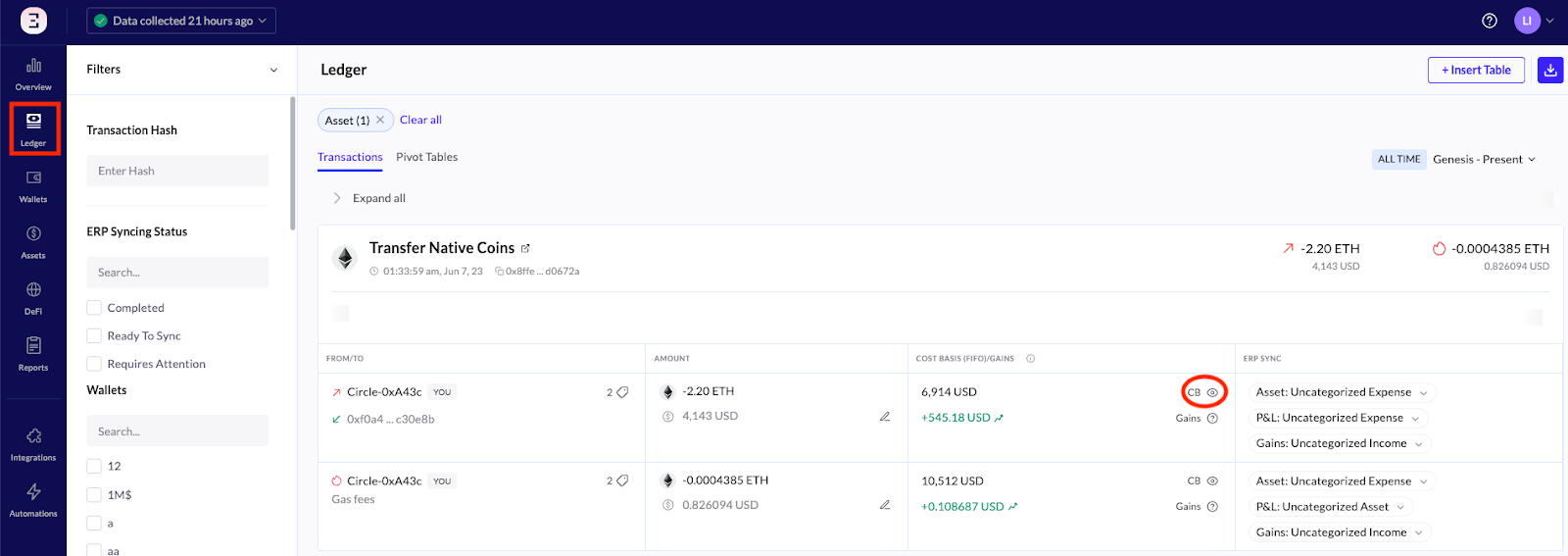
When you navigate to the Ledger tab and select a specific transaction, you will see a "CB" (Cost Basis) icon next to each inflow or outflow. Clicking this icon allows you to view the exact cost of each "lot" currently in your stack for that transaction.
Asset View
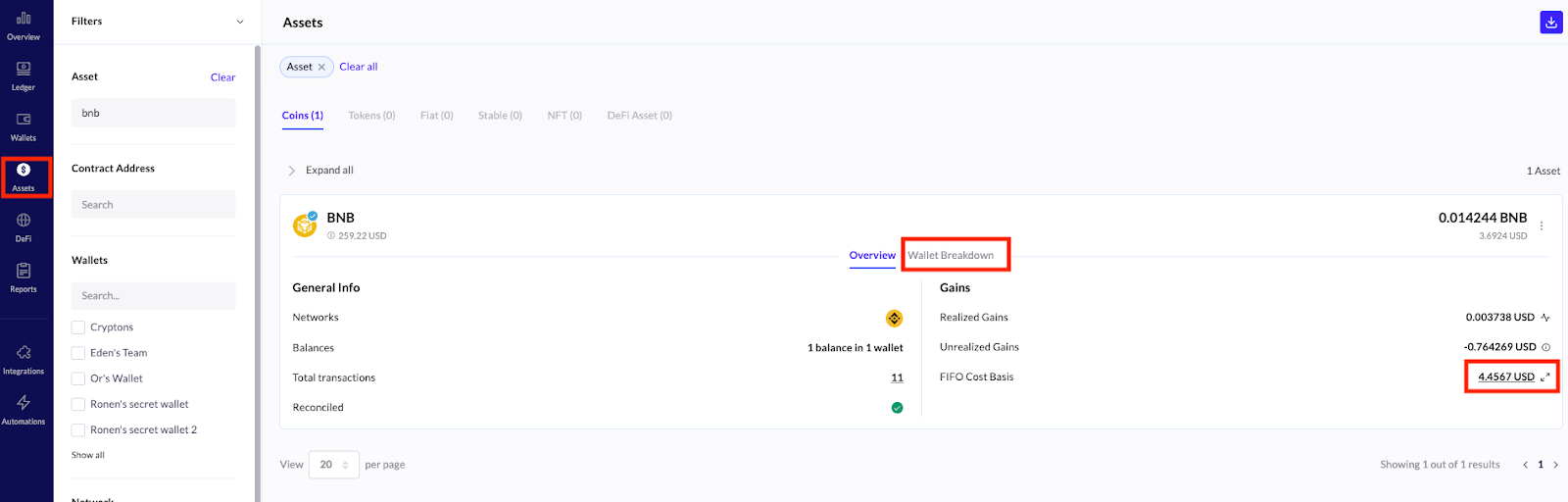
Within the Asset tab, selecting a specific currency opens a deeper view of your holdings. By clicking on the value next to the “FIFO Cost Basis” row, you can view the chronological "stack" for that asset across the entire organization. This detailed view breaks down exactly how the total cost basis was calculated.
Additionally, you can click the “Wallet Breakdown” button to see a distribution of which wallets hold that specific asset. This view also displays the Fair Market Value (FMV) of those holdings based on your selected date.
How are Internal Transfers Accounted For?
When moving assets between two wallets within the same organization, the system treats the movement as a non-taxable event. While no gain or loss is triggered, the way the "stack" is reorganized depends on your account configuration.
1. Per Organization Configuration (Global Stack)
If your account is configured at the organization level, internal transfers do not affect the cost basis or the chronological order of your assets.
The Logic: Because all wallets share one master stack, moving a token from Wallet A to Wallet B is seen as a simple "location change."
The Result: The original cost basis and the asset's position in the global stack remain exactly as they were when the asset first entered the organization.
2. Per Wallet Configuration (Isolated Stacks)
Under a per-wallet configuration, an internal transfer moves an asset from one independent stack to another. While no gain is calculated, the "order" of the receiving wallet's stack will change.
The Logic: The asset is removed from the original wallet’s stack and "slides into" the stack of the receiving wallet.
The Result: The receiving wallet’s stack will be reorganized based on your chosen accounting method (FIFO, LIFO or WAC).