
Roll-ups in TRES Finance
What Are Roll-ups in TRES Finance?
Roll-ups in TRES Finance are an advanced feature in the Ledger page designed to consolidate identical and/or repetitive transactions into a single summarized journal entry. This approach streamlines transaction management, optimizes system performance, and reduces the amount of journal entries posted to your connected ERP. Roll-ups are particularly beneficial for transactions like staking rewards and gas fees, which occur frequently throughout the day.

Why Should You Use Roll-ups?
Reduce Transaction Volume: by aggregating multiple transactions into one entry, roll-ups significantly lower the overall number of transactions processed in your account. This ensures your transaction volume remains manageable and TRES can run more quickly. Note that TRES still must index and price all transactions first before rolling them up. Thus, the total transaction volume based on your contract is counted pre-roll-ups.
Fewer journal entries to sync: Roll-ups combine identical transactions into one "rolled up" transaction. This results in only one journal entry needed for that day or month for the type of transactions that fit the roll-up rule's conditions.
Simplify Data Management: Roll-ups make your transaction logs easier to analyze and manage by condensing frequent, repetitive transactions into more concise records. This makes reporting and auditing faster and more straightforward.
How Do Roll-ups Work?
Roll-ups aggregate multiple identical transactions into a single entry, typically based on a set time frame, such as daily or monthly.
Roll-up transactions take an average fiat value of all the combined sub-transactions. Since the fiat value of a digital asset can differ throughout the day, the fiat value of each rolled up transaction is priced at the original timestamp and when combined, it becomes an average. This also means if you consolidate inflow transactions, you will reduce the number of new tax lots.
Example:
Without Roll-ups: If you receive staking rewards every day in the same wallet, for the same asset and MethodId. This would result in a transaction and journal entry for each day.
With Roll-ups: Each transaction is combined into one "rolled up" transaction, and the journal entry reflects the total staking rewards for that month. There is no difference to your monthly close, other than fewer journal lines.
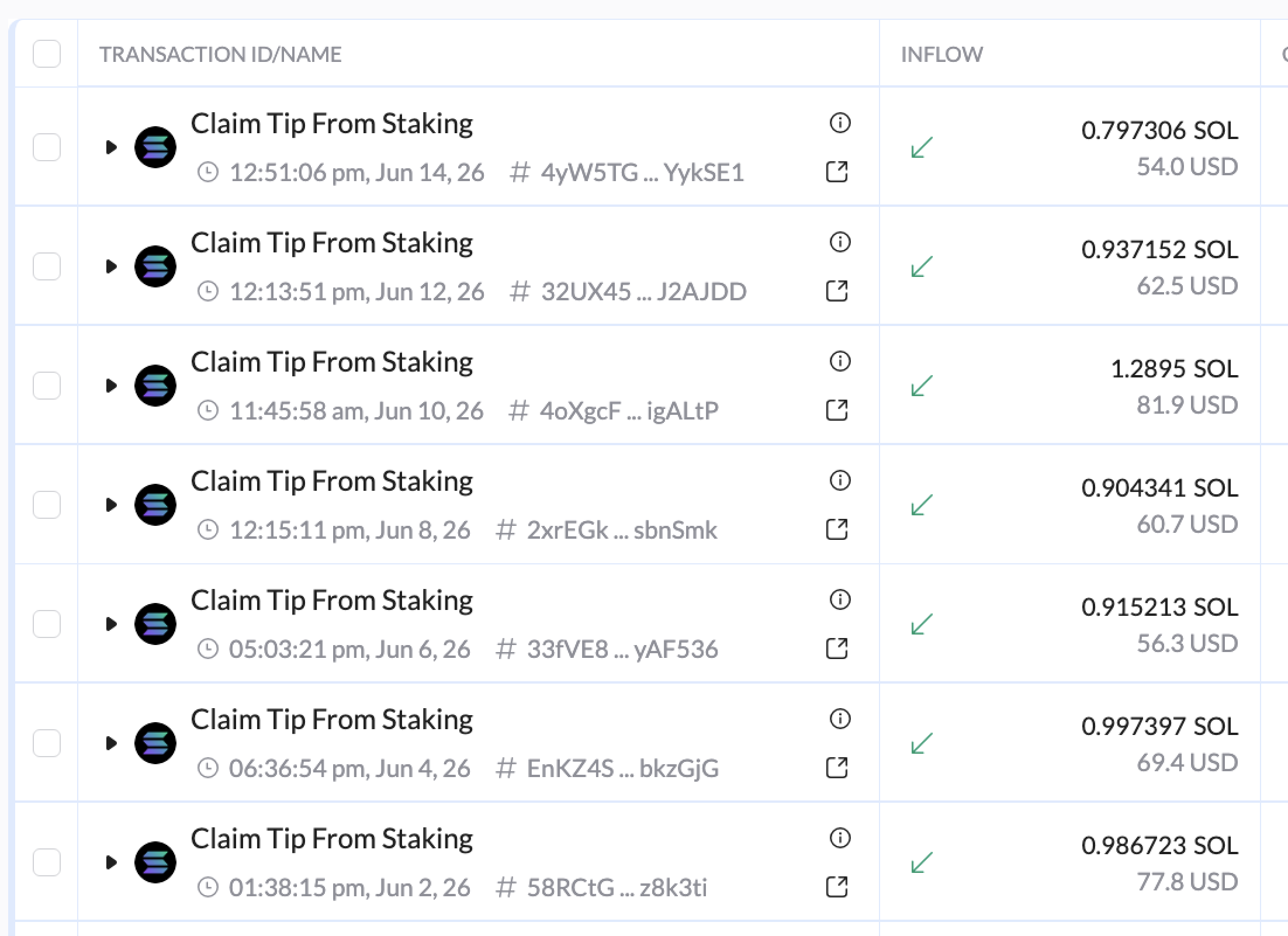
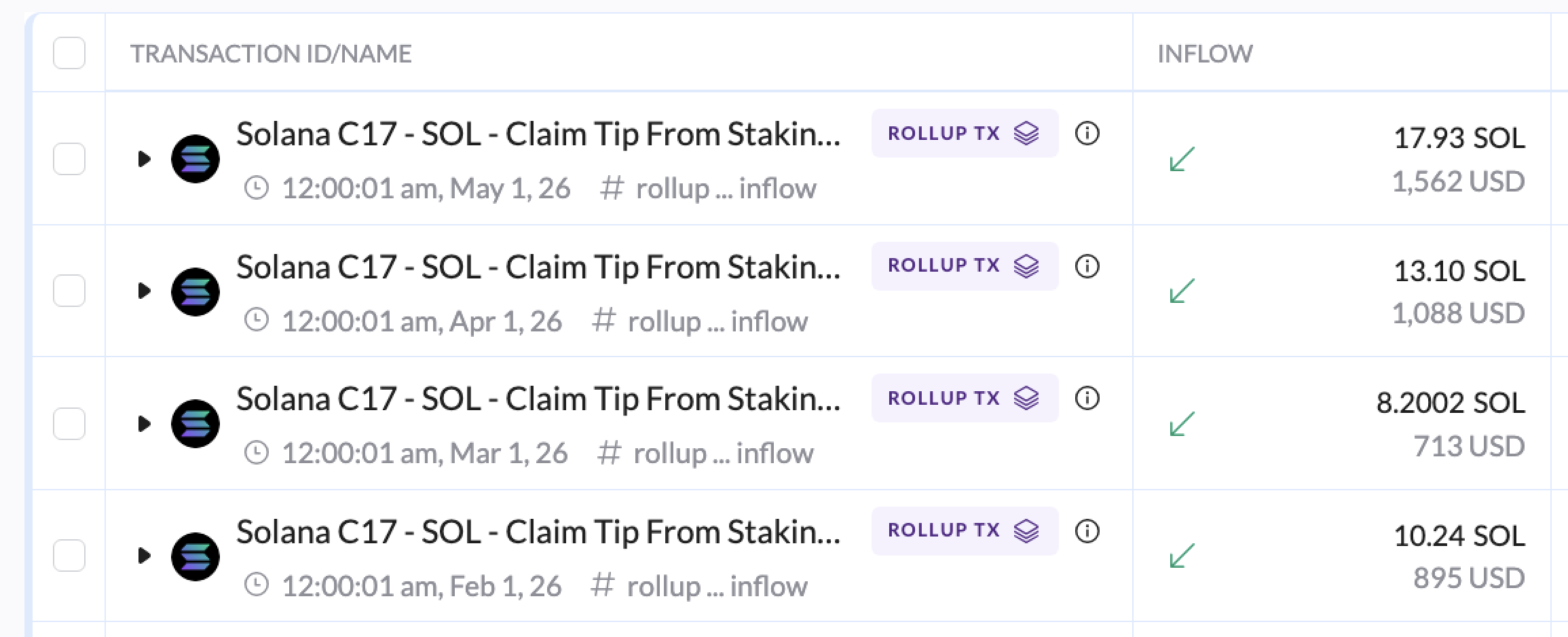
The summarized journal entry still provides essential financial details, ensuring your records remain accurate and complete.
How to Create Roll-up Rules
See below for instructions on how to create roll-up rules in your TRES account today.
If you're unsure if roll-ups are included in your package with TRES, reach out to your Customer Success Manager or email support@tres.finance.
Automations
The Create Transaction Roll-up automation is designed to declutter your ledger.
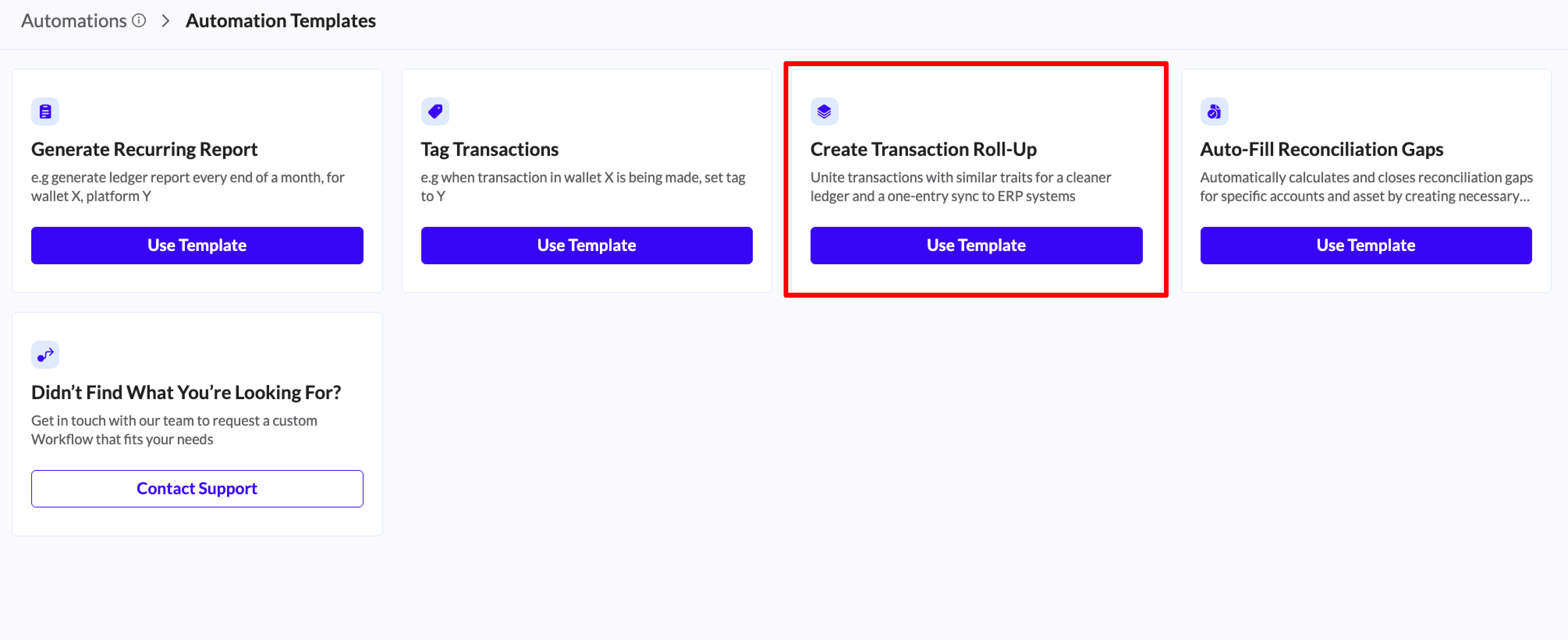
Step 1: Navigate to the Automations tab
Click the "Add Automation" button.
Select the "Create Transaction Roll-up" template.
Click "Use Template".
Step 2: Define Roll-up Conditions
Identify which transaction types should be rolled up together.
Select Conditions: Choose the shared traits for the transactions you want to group.
Network: For example, group all Polygon network activity
Asset: Choose only one asset at a time
Direction: Inflow or Outflow (gas fees are always outflows)
Fees: Include, Exclude, or Fees only (note: if you "Include" fees in a rule for Inflow transactions, nothing will happen as fees are only paid for sending tokens - outflows)
Wallet: roll-ups rules are always based on one wallet at a time
Expand the conditions by clicking Show More Filters for even more granular settings, such as MethodId, sender or received wallet address and minimum or maximum amounts.
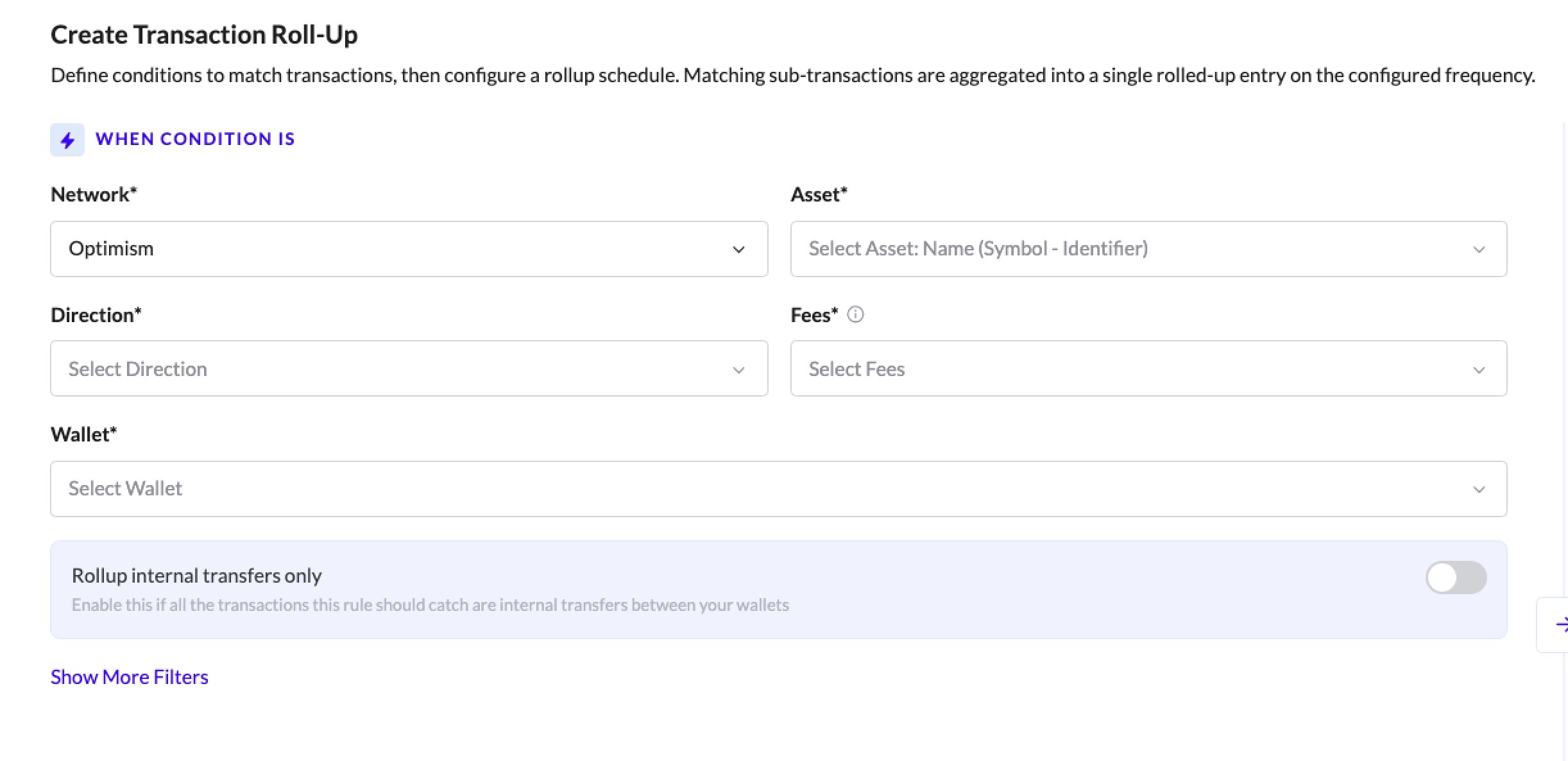
Overly broad roll-ups can cause issues. If you roll-up an asset in a wallet with no other criteria, and that wallet includes Internal Transfers to other wallets, you should note to select Exclude internal transfers in the Show More Filters. You should consider adding additional criteria to your roll-up rule.
Step 3: Configure Roll-up Settings
Determine the timeframe and export behavior.
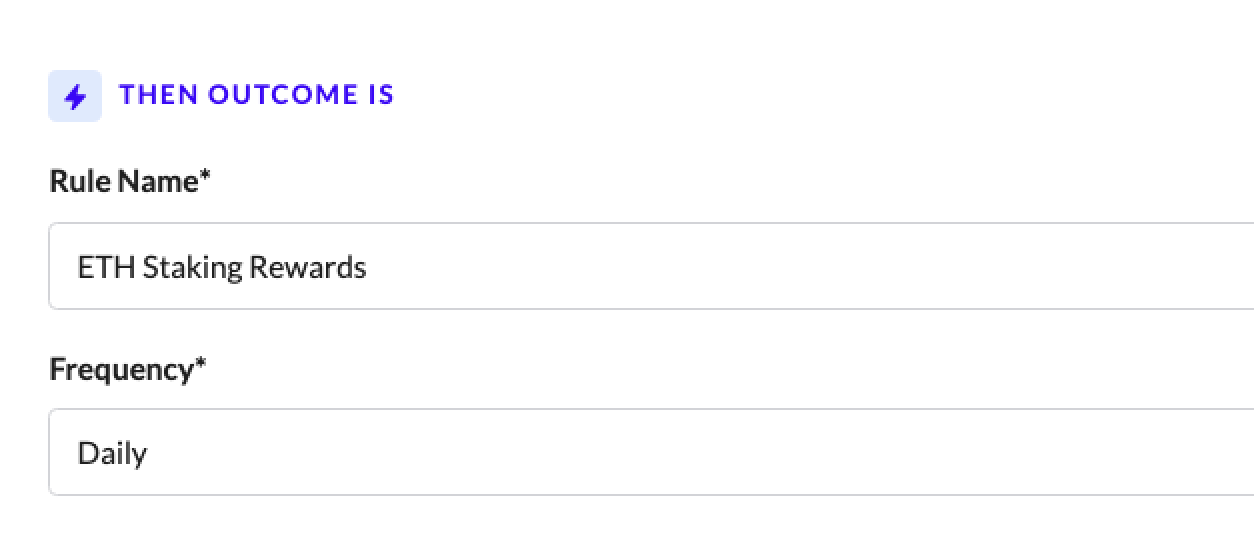
Rule Name: an easily identifiable name for the roll-up rule (usually a combination of the activity type, asset, wallet, etc. can be used here).
Frequency: Set how often the roll-up happens (Daily or Monthly). Monthly inflow roll-ups will appear in your ledger on the first day of the month, whereas monthly outflow roll-ups will appear in your ledger on the last day of the month. For example, all staking rewards from January 1 to January 31 will appear as an inflow on January 1. All expense outflows from January 1 to January 31 will appear as an outflow on January 31. This is done to avoid potential issues with negative inventory.
Step 4: Activate
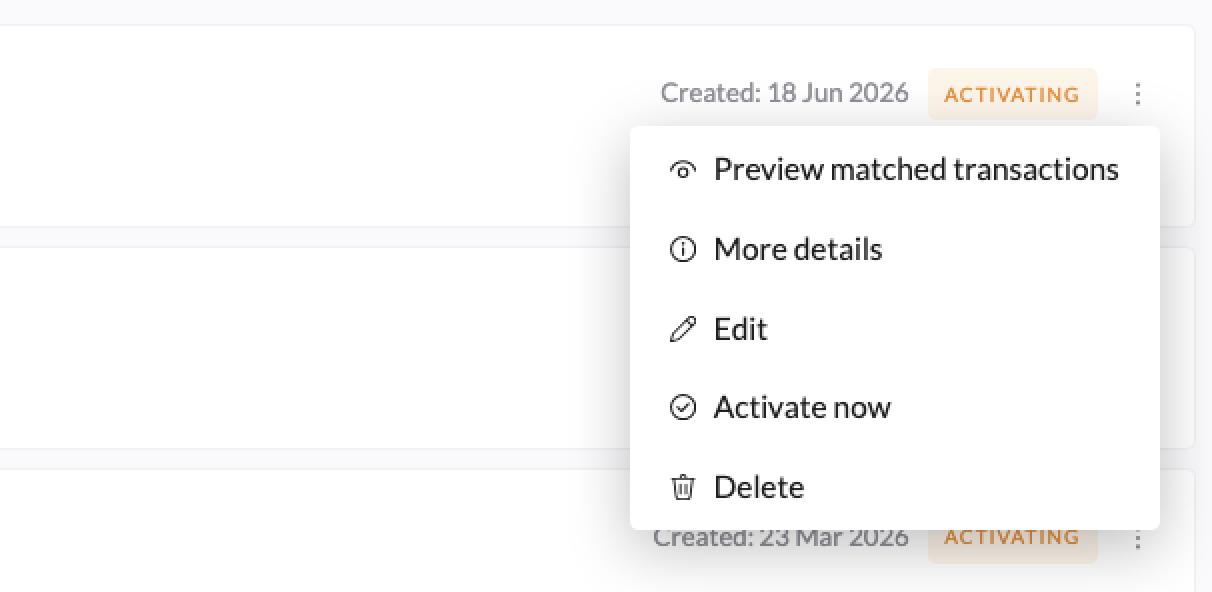
Click "Create Automation" to start the process. The roll-up rule will land in a Pending status until the next transaction that syncs to your Ledger fits the conditions of the rule. It can take up to 24 hours for the automations to become active, or you can select Activate now. From there, TRES will take some time to fully review and roll-up transactions (and if you are in the middle of a month, the current month's transactions won't be rolled up until 2-3 days into next month).
If you already have existing transactions that fit the rules conditions, you can select "Activate now" to immediately start running the roll-up:
Benefits Recap
By using roll-ups, you can:
Reduce transaction volume
Simplify journal entries
Maintain accurate financial records
If you have additional questions or need assistance with enabling roll-ups, please reach out to your Customer Success Manager or contact our support team via the in-app chat or at support@tres.finance.