
Closing the Books with TRES
How TRES helps you confidently close your accounting period — from raw blockchain data to audit-ready financial statements.
Overview
"Closing the books" in crypto accounting means reaching a state where all transactions are:
Complete — every on-chain and off-chain movement is captured
Priced — every transaction has an accurate fiat value
Classified — every transaction has the correct activity label
Clean — spam and irrelevant noise is excluded
Reconciled — your records match on-chain reality
Mapped — transactions are assigned to the correct GL accounts in your ERP
Calculated — cost basis, realized/unrealized gains, and P&L are accurate
TRES automates each of these requirements, working as a unified pipeline so you spend less time chasing data issues and more time on strategic accounting decisions.
1. Data Collection & Reconciliation
Automated Data Ingestion
TRES connects to your blockchains, exchanges, and custodians and runs a continuous pipeline:
Collect — transaction data is automatically fetched from all your connected sources
Enrich — data is enriched with token metadata, contract interactions, and DeFi protocol detection
Build — raw data is transformed into standardized ledger entries with amounts, directions, and counterparties
Reconcile — computed balances are compared against actual on-chain/exchange balances to verify completeness
Balance Reconciliation
TRES continuously compares your ledger balances against on-chain reality for every wallet and asset. When a discrepancy is detected, it's immediately surfaced in the Reconciliation tab on your Overview page — showing you exactly which wallets and assets need attention and why.
Scheduled Reconciliation Pipelines
For complex multi-custodian setups, TRES runs fully automated daily reconciliation cycles that:
Sync the latest data from your custodians
Commit and verify on-chain data
Match internal records against external sources
Automatically backfill any missing items
This runs on a schedule so your data stays complete without any manual effort.
2. Fiat Value (Pricing)
Every transaction needs an accurate fiat value for your books. TRES uses a multi-layered pricing engine to ensure comprehensive coverage.
How Pricing Works
TRES tries multiple pricing sources in priority order until an accurate price is found:
Custom strategies — specialized pricing for DeFi vault tokens, debt tokens, LP tokens, and platform-specific assets
Market data providers — CoinGecko, CoinMarketCap, and other aggregators
DEX on-chain pricing — direct pool rates for tokens only available on decentralized exchanges
LP Token pricing — resolves pool composition for liquidity provider tokens
Exchange-specific data — prices sourced directly from your exchange (Kraken, Coinbase, Binance, etc.)
Price Quality Assurance
A validation pipeline automatically catches anomalous prices:
Stablecoin peg validation (auto-fixes flash crash artifacts)
Historical floor/ceiling checks for major assets
General reasonableness bounds
Automatic substitution when a price fails validation
Resolving Missing Prices
When standard pricing channels don't cover an asset, TRES provides multiple resolution paths:
Swap alignment — derives price from the other side of a swap transaction
LP recalculation — calculates price from pool composition
Similarity matching — uses pricing from similar transactions in your organization
Manual configuration — you can set a fixed price for an asset over a date range
The Missing Fiat Value card on your Overview shows exactly which assets still need pricing, with direct links to the affected transactions.
3. Spam Classification
Spam transactions (airdrops, dust attacks, scam tokens) pollute your ledger and distort financial reports. TRES automatically identifies and excludes them.
How Spam is Detected
Risk API analysis — contracts and tokens are checked against security databases for known malicious behavior, fake assets, and risky senders
Dust attack detection — identifies address poisoning attempts where attackers send tiny amounts to plant look-alike addresses in your history
Pattern recognition — mass-airdrop patterns, symbol impersonation, and other spam indicators
Manual override — you can always mark any transaction as spam (or not spam), and your decision persists
What Happens to Spam
Once classified, spam transactions are automatically excluded from:
Your transaction count and ledger views
Cost basis calculations
Roll forward reports
ERP sync
All financial reports
Spam never affects your financial close.
Always Running
Spam detection runs continuously in the background — new transactions are checked within minutes of appearing, and previously unclassified assets are periodically re-evaluated as new intelligence becomes available.
4. Transaction Classification & Rules
Automatic Activity Labels
TRES assigns activity labels (Swap, Staking Rewards, Internal Transfer, Operations, etc.) to every transaction using a rule engine:
Your custom rules take priority — create rules scoped to your organization for your specific workflows
Global rules provide intelligent defaults for common patterns across all supported platforms
Classification considers the transaction method, platform, asset, sender, recipient, and contract protocol.
How Classification Affects Your Books
Classification | What It Means for You |
|---|---|
Spam | Excluded from all financial calculations |
Internal Transfer | Not a taxable event; cost basis carries between wallets |
Staking Rewards | Recognized as income in your reports |
Swap | Buy/sell values are automatically aligned |
Operations | Standard transaction for your ledger |
Transaction Rollups
If you have high-volume activity (thousands of daily staking rewards or gas fees), TRES can aggregate them into summary entries per time period:
Configure by wallet, asset, direction, and interval (daily or monthly)
Balances stay accurate — only the presentation changes
AI suggests optimal rollup rules based on your transaction patterns
5. Internal Transfer Detection
When you move funds between your own wallets, those aren't taxable events. TRES automatically detects these and handles them correctly.
Intelligent Matching
TRES uses a two-stage approach:
Exact matching — pairs movements within the same transaction, including cross-chain bridges (e.g., USDC on Solana ↔ USDC on Ethereum)
Fuzzy matching — finds related movements across different transactions within a time window, handling amount variations from fees or bridges
Why It Matters for Your Books
When an internal transfer is detected:
The original purchase cost carries through to the receiving wallet
P&L on the transfer is always zero (it's not a sale)
When you eventually sell from the receiving wallet, the correct original cost basis is used
This prevents artificial gains or losses from appearing on internal movements.
6. Cost Basis Calculation
TRES calculates cost of goods sold (COGS), profit & loss, and realized gains — the numbers you need for tax returns and financial statements.
Supported Accounting Methods
Method | Description |
|---|---|
FIFO | First In, First Out — oldest lots sold first |
FIFO Impairment | FIFO with impairment write-down support |
LIFO | Last In, First Out — newest lots sold first |
Maximize Gains | Sells cheapest lots first |
Maximize Losses | Sells most expensive lots first |
Weighted Average | Average cost across all lots |
What's Handled Automatically
Short positions — when you sell more than your available inventory, TRES tracks the shortfall and resolves it when you acquire more
Cross-wallet resolution — short positions are resolved across wallets at the organization level
Internal transfer carrying — original cost follows assets through wallet-to-wallet movements
Holding period tracking — P&L is split into short-term and long-term for tax reporting
Per-wallet or org-level scope — choose how cost basis is calculated for your organization
Financial Issue Detection
TRES flags data-quality issues that could affect your cost basis and surfaces them on the Missing Cost Basis card on your Overview. Each issue links directly to the affected transactions.
Locked Periods
Once you've finalized a period, lock it to prevent any changes:
No reclassification of transactions
No internal transfer matching changes
No cost basis modifications
No spam reclassification
Your audited data stays immutable.
7. ERP Integration & Sync
Supported Systems
QuickBooks — connect via OAuth
NetSuite — enterprise ERP with full subsidiary/class/department support
Xero — connect via OAuth with department and entity support
Rillet — direct API integration
Manual — upload your chart of accounts via CSV
How Mapping Works
TRES maps your crypto transactions to the correct GL accounts using a rule system you control:
Specific transaction rules — exact matching for particular transactions
Internal transfer rules — dedicated handling for inter-wallet movements
Custom rules — your logic based on platform, asset class, wallet, or contact
Default rules — catch-all assignments for everything else
Asset Class Grouping
Rules are created at the asset class level, not per-token. One rule for "Bitcoin" covers BTC, WBTC, renBTC, and any other Bitcoin-related asset. This keeps your rule set manageable even as new tokens appear.
Sync Tracking
Every transaction's sync status is tracked (Pending, In Progress, Completed, Failed, Ignored). If you modify data in TRES after syncing, the system flags those transactions as "Changed After Sync" so you can decide whether to re-sync.
Chart of Accounts Refresh
Your ERP's chart of accounts is automatically refreshed — new accounts, updated names, and organizational data (departments, classes, subsidiaries) stay in sync.
8. AI & Automation (Autopilot)
Autopilot — Your AI Accounting Assistant
Autopilot is an AI agent that helps you execute accounting workflows conversationally:
Analyze transaction patterns and suggest classification rules
Generate optimal rollup rules for high-volume activity
Map your chart of accounts with guided ERP setup
Run scheduled checks that monitor your data health automatically
Close the Books Workflow
The flagship Autopilot workflow runs a comprehensive readiness check in one pass:
Reconciliation issues (wallets where the ledger doesn't match on-chain)
Missing cost basis (transactions with financial issues)
Missing fiat values (unpriced transactions)
COA mapping gaps (transactions without ERP account assignments)
Locked period status
You get a structured report with a categorized task list showing exactly what to fix and in what order.
AI-Powered CSV Import
When you need to import off-chain transactions, AI analyzes your file structure, proposes column mappings, and transforms the data — with error feedback if anything doesn't match.
AI Rollup Suggestions
TRES analyzes your high-volume transaction patterns and proposes optimal rollup rules — saving you from manually configuring aggregation for thousands of repetitive entries.
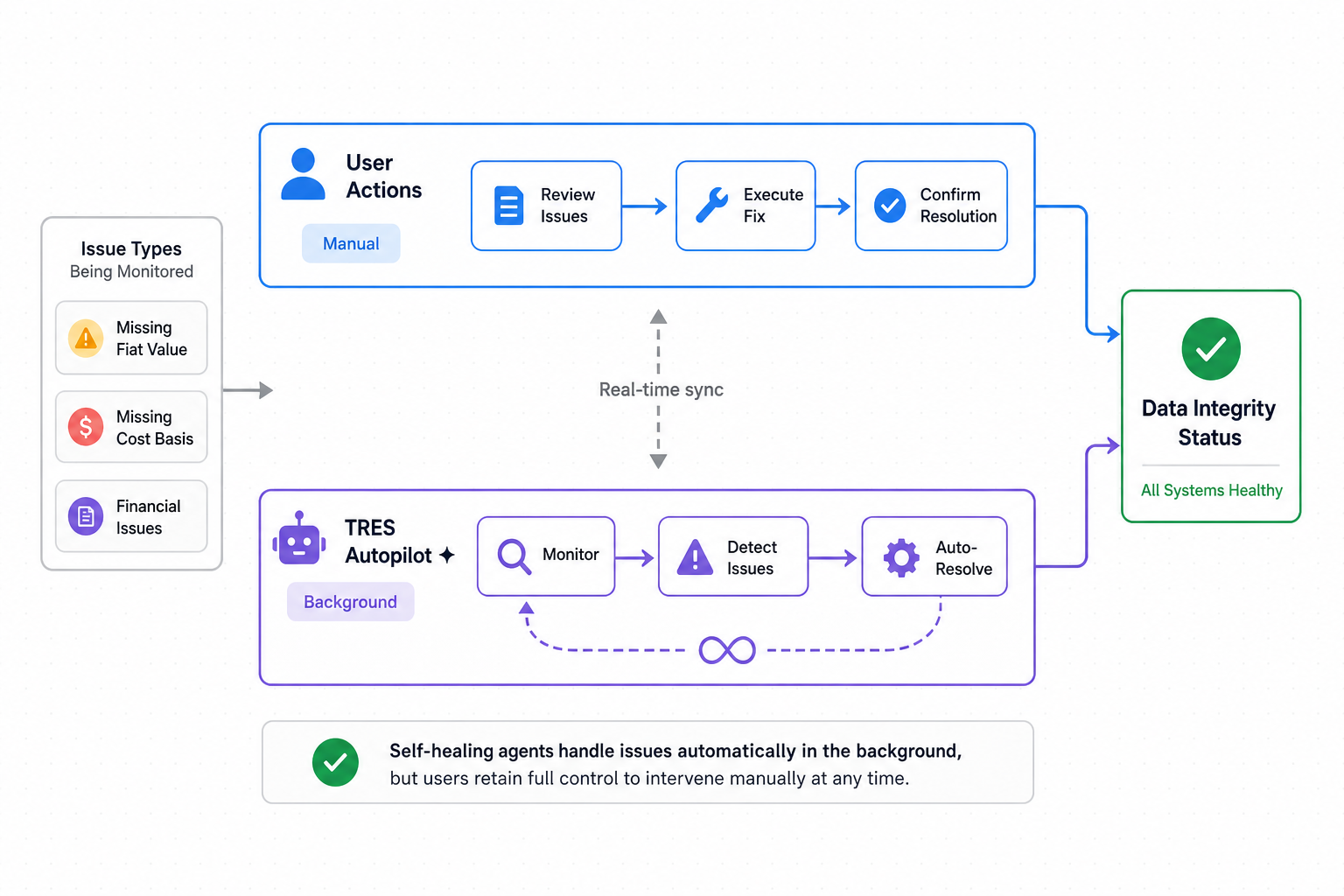
9. Agentic Workers — Self-Healing Data
TRES operates as an agentic system that continuously monitors your data quality, identifies issues, and resolves them — often before you even notice a problem.
How It Works
The system runs a continuous loop:
Detect — scheduled scans identify data issues across your organization (missing prices, reconciliation gaps, spam, cost basis problems, unmapped assets)
Create ticket — issues are logged as tasks with priority, category, and a resolution plan
Resolve — automated workflows execute the corrective action (recalculate prices, mark spam, trigger cost basis recalculation, etc.)
Verify — success criteria are checked and the task is closed
What Gets Resolved Automatically
Issue | Automated Resolution |
|---|---|
Missing fiat values | Recalculation triggered for the affected asset or scope |
Spam contamination | Classification rule created and all affected transactions reclassified |
Cost basis gaps | Recalculation dispatched for affected asset classes |
Pricing configuration gaps | Mapping requests created and routed for resolution |
Issues requiring human judgment | Escalated to your success team with full context |
Task Board
All tasks — whether system-generated or manually created — are tracked on a kanban board:
Suggestions → Backlog → In Progress → In Review → Done
Each task shows its priority, category, execution plan, and current status. You have full visibility into what TRES is doing on your behalf.
10. Reporting & Audit Readiness
Roll Forward Report
The definitive audit report that proves your balance movements:
Opening Balance + Inflows − Outflows − Fees = Closing Balance
For each asset and wallet, you get:
Token quantities with on-chain balance verification
Fiat valuations at period start and end
Cost basis (opening and closing)
Realized and unrealized gains
Additional Reports
Rollup Breakdown (detail behind aggregated transactions)
Cost Basis reports (per asset class, per wallet)
Staking Rewards reports
Full ledger export
11. Data Integrity Dashboard
Your Overview page provides a unified Data Integrity Status panel that shows all blockers to closing at a glance:
Widget | What You See |
|---|---|
Autopilot Workflows | Active AI workflows and their progress |
Integration Status | Health of your connected platforms |
Missing Cost Basis | Transactions with financial issues to resolve |
Missing Fiat Value | Assets lacking pricing, with transaction counts |
Each widget links directly to the relevant resolution path — creating a clear journey from "not ready" to "ready to close."
How It All Fits Together
Each layer feeds the next:
Data Completeness — Automated collection, balance reconciliation, scheduled pipelines
Data Cleanliness — Spam removed, internal transfers identified, activity labels assigned, rollups applied
Valuation — Multi-source pricing with validation, missing values resolved, swap alignment
Financial Calculations — Cost basis (6 methods), realized/unrealized gains, internal transfer carrying
ERP Sync — Rule-based GL mapping, tracked lifecycle, chart of accounts refresh
Audit Readiness — Roll forward report, on-chain verification, data integrity dashboard, locked periods
AI & Automation — Autopilot workflows, CSV import, rollup suggestions, scheduled reconciliation
Self-Healing Data — Continuous scanning, automatic task creation and resolution
Data must be complete before it can be clean, clean before it can be valued, valued before cost basis can run, and cost basis must be accurate before ERP sync produces correct journal entries. TRES automates each layer and surfaces remaining gaps through the Data Integrity dashboard, giving you a clear, actionable path to a confident period close.