
Positions
Overview
The Positions page provides a comprehensive view of all complex, multi-component financial positions held by your organization. This includes assets locked in staking protocols, liquidity pools (LPs), DeFi lending platforms, and other structured arrangements.
The page is designed to help you:
Monitor performance and value across all complex holdings.
Analyze your portfolio exposure by protocol, network, and underlying asset.
Track the specific components (underlying assets) that make up each position.
Positions List Structure
The Positions list defaults to a high-level Grouped View for easy navigation.
Collapsed View (Grouped):
Positions are automatically grouped together by their Protocol, Network, or Application (e.g., Avalanche P-Chain, Ethereum Staking, Pancakeswap3).
Group Name - The name of the protocol or network hosting the position.
Positions Count - The number of individual positions contained within that group.
Group Value - The total aggregated USD value of all positions within that group.

Expanded View (Detailed):
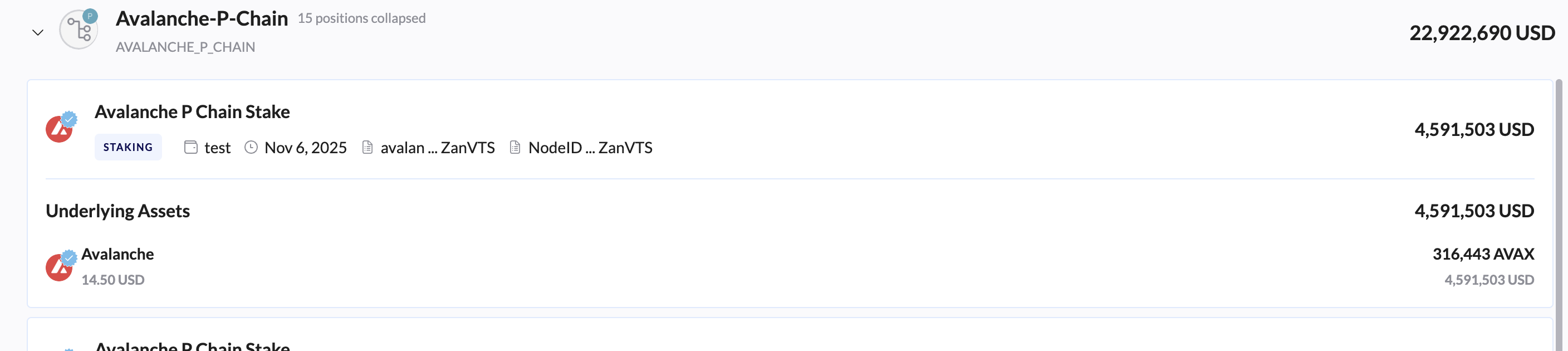
Clicking the arrow next to a group (e.g., Avalanche P-Chain) expands the view to show the individual positions and their components.
Individual Position - The specific instance of the complex position. It includes a Status Tag and identifying details.
Status Tag - A label indicating the position type.
Position Details - Includes the Date the position was initiated and the Wallet or Node IDs involved.
Underlying Assets - The core asset(s) that are locked or deposited in the position.
Asset Details - Shows the current price per unit, the total native balance, and the total USD value of that asset component.
Filtering Options
The Positions page provides two main filters to help you customize your view, both accessible via dropdown menus at the top of the list:
Wallet Filter:
Function: Allows you to filter the entire list of positions to include only those associated with one or more specific wallet addresses or custom wallet names.
Use Case: Ideal for analyzing the positions held by a single custodial wallet or a specific portfolio belonging to a department.
Features: Includes a search bar to quickly find a wallet address or name, and a "Select all" option.
Asset Classes Involved Filter:
Function: Allows you to filter positions based on the specific underlying digital assets (Coins or Tokens) that comprise the position.
Use Case: Useful for seeing your total exposure to a single token, regardless of whether it is held outright or locked in a protocol (e.g., filter by Avalanche to see all staked positions, LP tokens, and direct AVAX holdings).
Features: Includes a search bar to find assets by name or ticker and a comprehensive list of all assets involved in positions (e.g., 1INCH, Aave, 00 Token, etc.).
Export Report
The Export Report button allows you to generate and download a comprehensive report of all currently visible positions (based on applied filters).
Related report:
Staking Rewards & Positions