
GraphQL API Explorer
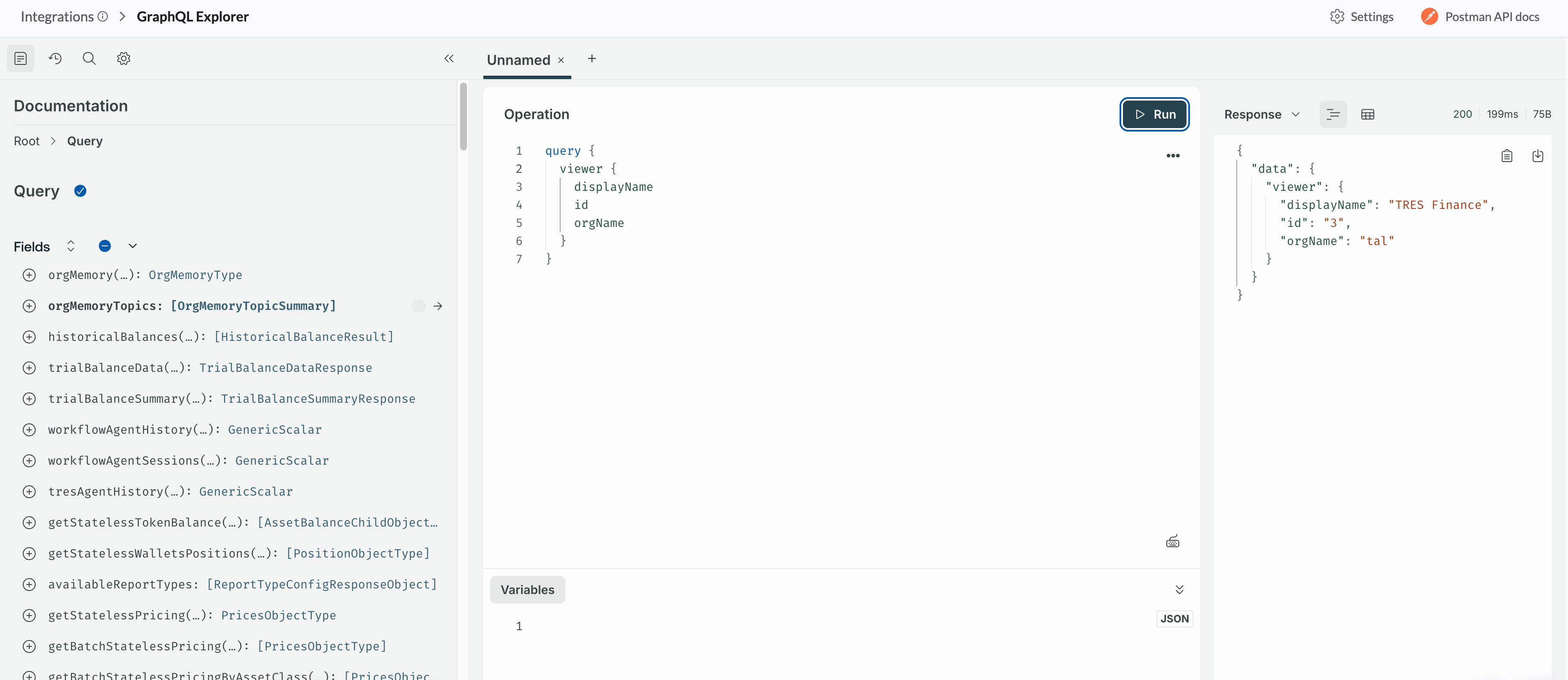
A built-in GraphQL IDE inside the Tres dashboard. Write, run, and test queries against our API — no external tools or setup required.
Location: Integrations → GraphQL Explorer
Features
Interactive query editor — Full auto-complete, syntax highlighting, and inline schema docs powered by Apollo Explorer.
Auto-authentication — Uses your current session token automatically. No need to copy/paste tokens.
Custom headers — Add any HTTP headers via the Settings button. They persist across sessions.
Auth override — Set your own
Authorization: Bearer <token>header to test with a different user or API key.Persistent state — Your queries, tabs, and headers are saved in the browser. Pick up right where you left off.
API docs link — Quick access to the Postman API documentation from the top-right corner.
How to Use
Go to Integrations → GraphQL Explorer in the dashboard.
Write a query in the editor (a sample
Viewerquery is pre-loaded).Press the play button to run it. Results appear instantly.
(Optional) Click Settings to add custom headers or override the auth token.
FAQ
Do I need an API key?
No. The explorer uses your active dashboard session for authentication by default.
Can I use a different token?
Yes. Open Settings, add a header with key Authorization and value Bearer <your-token>. This overrides the session token.
Are my queries saved?
Yes. Both queries and custom headers are saved in your browser's local storage automatically.
Where are the full API docs?
Click Postman API docs in the top-right, or go to api-docs.tres.finance.