
Asset Allowances
What is Asset Allowances?
When one of your wallets interacts with an on-chain app (a DEX, lending protocol, bridge, etc.), it grants that app an allowance - permission to move a specific token on the wallet's behalf. Allowances stay active until you revoke them, so old, unused, or unlimited allowances can quietly put your funds at risk.
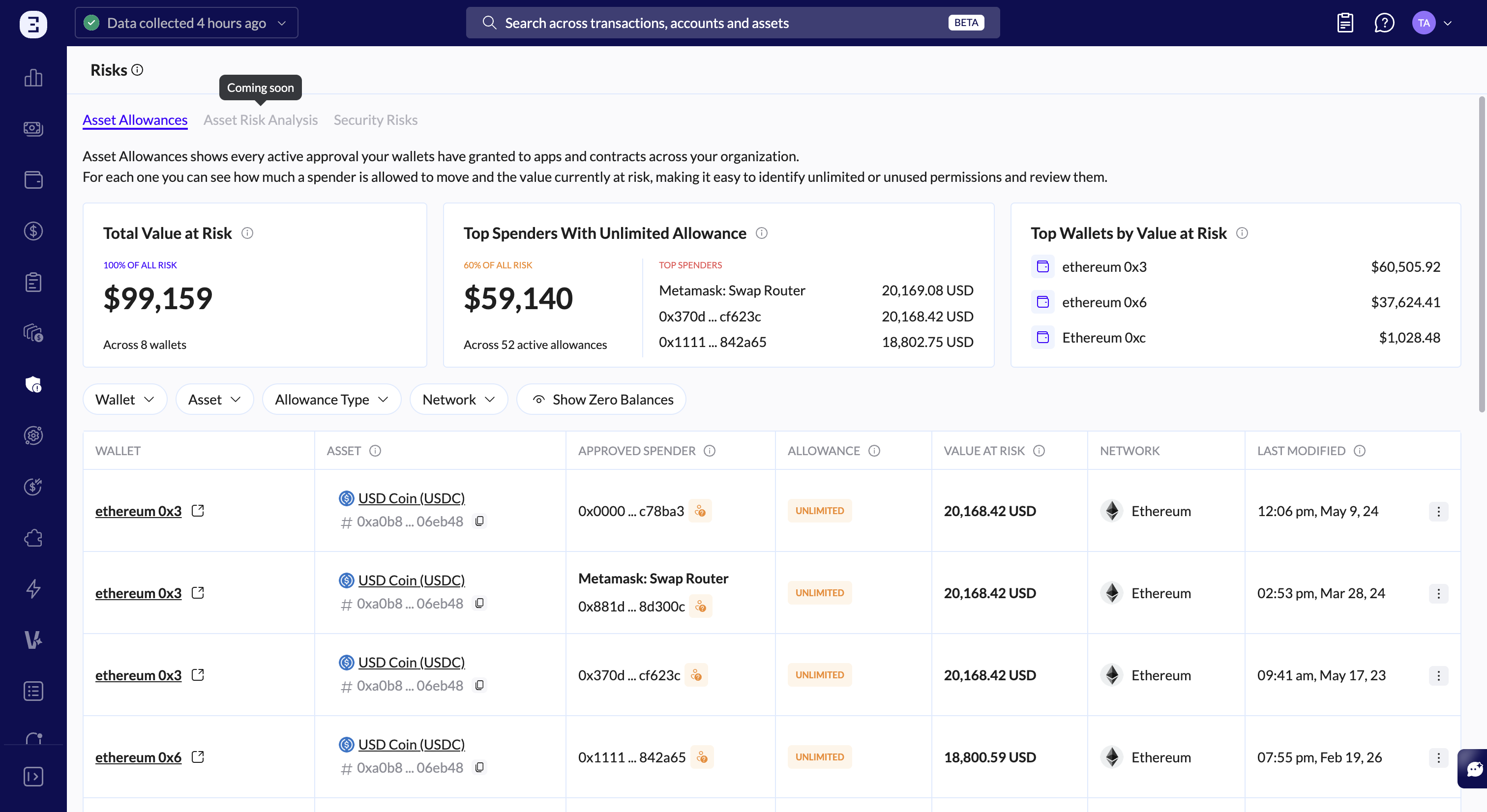
The Asset Allowances page brings every active allowance across your organization into one place, shows how much value is exposed by each, and helps you review and clean up the risky ones.
A few key terms:
Spender: the app or contract you've authorized to move a token.
Allowance: the maximum amount that spender is allowed to move.
Unlimited: an allowance with no cap and no expiry; the spender can keep pulling until you revoke it.
Value at Risk: the amount you could actually lose if a spender pulled everything it's allowed to, based on what your wallets currently hold.
The summary widgets
Three cards at the top give you the big picture:
Total Value at Risk: your total exposure across all allowances, plus the number of wallets involved. This is the headline number.
Top Spenders With Unlimited Allowance: how much of your risk comes from unlimited allowances, the number of active unlimited allowances, and the spenders behind the most exposure. These are usually the first ones worth reviewing.
Top Wallets by Value at Risk: your wallets ranked by total exposure, so you can see where risk is concentrated.

Reading the table
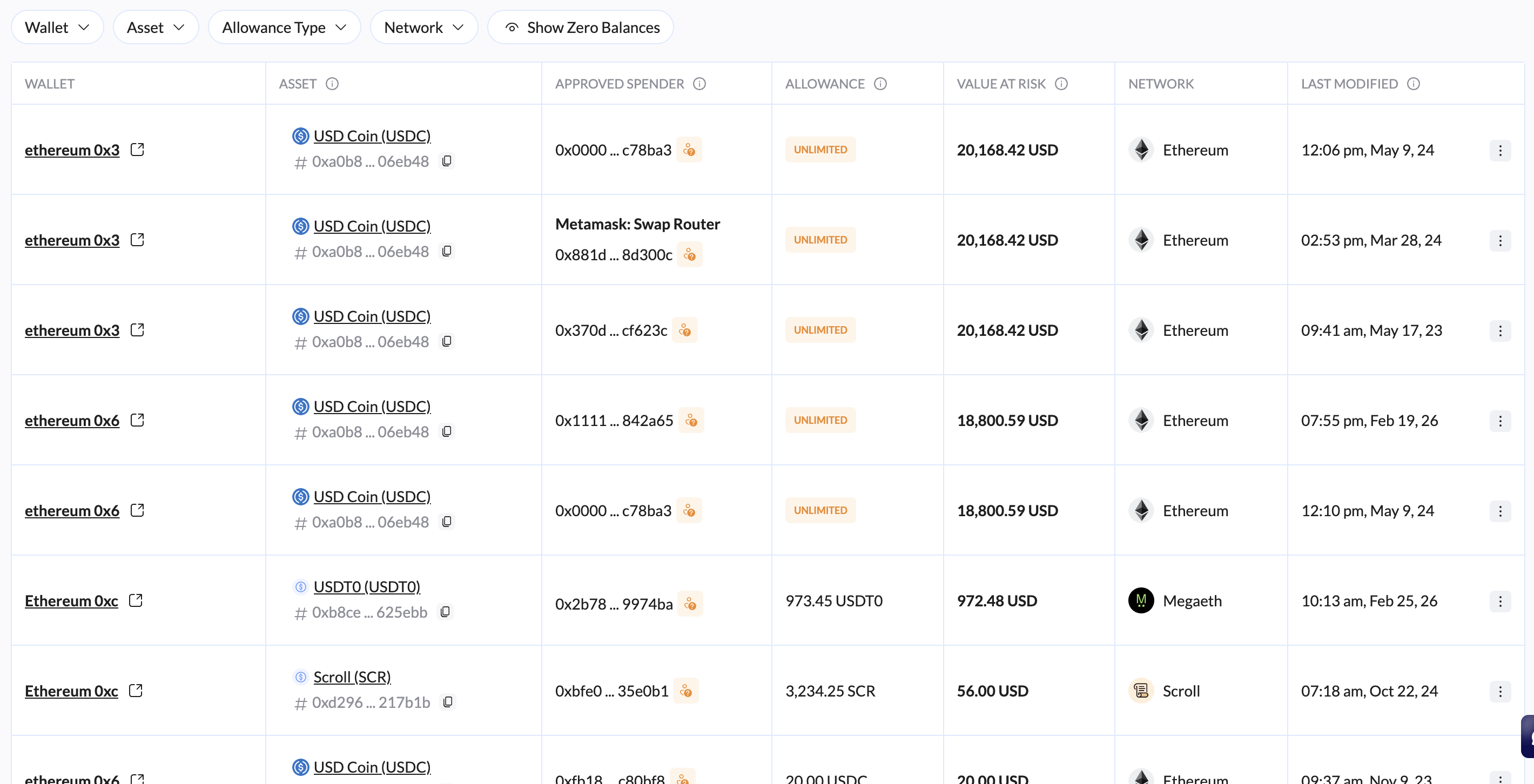
By default the table is sorted by highest value at risk, so your most exposed allowances appear first. Each row shows:
Column | What it shows |
|---|---|
Wallet | The wallet that granted the allowance (click the icon to open the wallet). |
Asset | The token the allowance applies to. |
Approved Spender | The app or contract authorized to move the token. Known spenders show a friendly name; your own/internal addresses are labeled. |
Allowance | The amount the spender can move, shown in tokens and fiat. "Unlimited" appears when there's no cap. Hover for a full breakdown. |
Value at Risk | The fiat value currently exposed to this spender. |
Network | The blockchain the allowance lives on. |
Last Modified | When the allowance was last granted or changed on-chain. A marker indicates allowances you've reviewed. |
The allowance breakdown
Hover the info icon in the Allowance column to see how the allowance has been used:
Approved: the total amount you authorized the spender to move.
Pulled: the amount the spender has already moved so far.
Remaining: the amount still left that the spender can move.
(For unlimited allowances, Approved shows "Unlimited.")
Organizing the view
Use the toolbar to focus on what matters:
Group by: view allowances flat, or grouped by Wallet or Asset.
Filters: narrow by Wallet, Asset, Allowance Type, Network, or Review Status (All / Reviewed / Not Reviewed).
Show Zero Values: include or hide allowances with no current value at risk.
Search: find allowances by spender, token, or wallet address.
Reviewing allowances
Asset Allowances is built for triage. From each row's ⋮ menu you can:
Mark as Reviewed: flag an allowance you've checked, so you can track what's been handled (and filter by Review Status). You can also unmark it later.
View Transactions: jump to the underlying activity for that allowance.
Common tasks
Find your biggest risks: the table is already sorted by value at risk, start at the top.
Tackle unlimited allowances: check the Top Spenders With Unlimited Allowance widget, or filter Allowance Type to unlimited.
Work through a cleanup: filter Review Status → Not Reviewed, handle each one, and mark it as reviewed as you go.
Focus on one wallet or chain: use the Wallet or Network filters, or group by Wallet.
FAQ
Does the value at risk update automatically? It reflects your current holdings and prices from the latest data collection.
Is there a limit on how often a spender can pull? No, allowances have no time, daily, or monthly limits. The only cap is the total allowance amount; unlimited allowances have no cap at all. The real protection is revoking allowances you no longer need.
What does "Last Modified" mean? The last time the allowance itself was granted or changed on-chain, not the last time the app used it. A very old date often means a forgotten permission worth reviewing.
Why is one of my own wallets listed as the spender? It's possible to grant an allowance to another address you control. These carry lower real risk since you own both sides, but they're shown for completeness.